Admin roles and permissions walkthrough
Reference for the files delivered in Main_File. Documentation updated 22 September 2026. Examples use fictional IDs and balances; replace them with values from your installation.
How access is decided
Dashboard administrators are stored in admin_users, separate from mobile users. Active admin_roles are assigned through admin_user_roles. Each role receives permission records through admin_role_permissions. AdminAuth combines permission slugs across all active roles: there is no explicit deny rule and no magic bypass merely because a role is named Super Admin.
View permissions control navigation and page access; action permissions control operations. Hiding a sidebar entry alone is not access control: test direct page URLs and server-side action denial. A room owner/moderator role in room_members is a different system from dashboard roles.
Example: create a Community Moderator
Perform this walkthrough in your own staging installation while signed in as an administrator with roles.view and roles.manage. The public demo can hide creation/save controls because its Demo role lacks roles.manage.
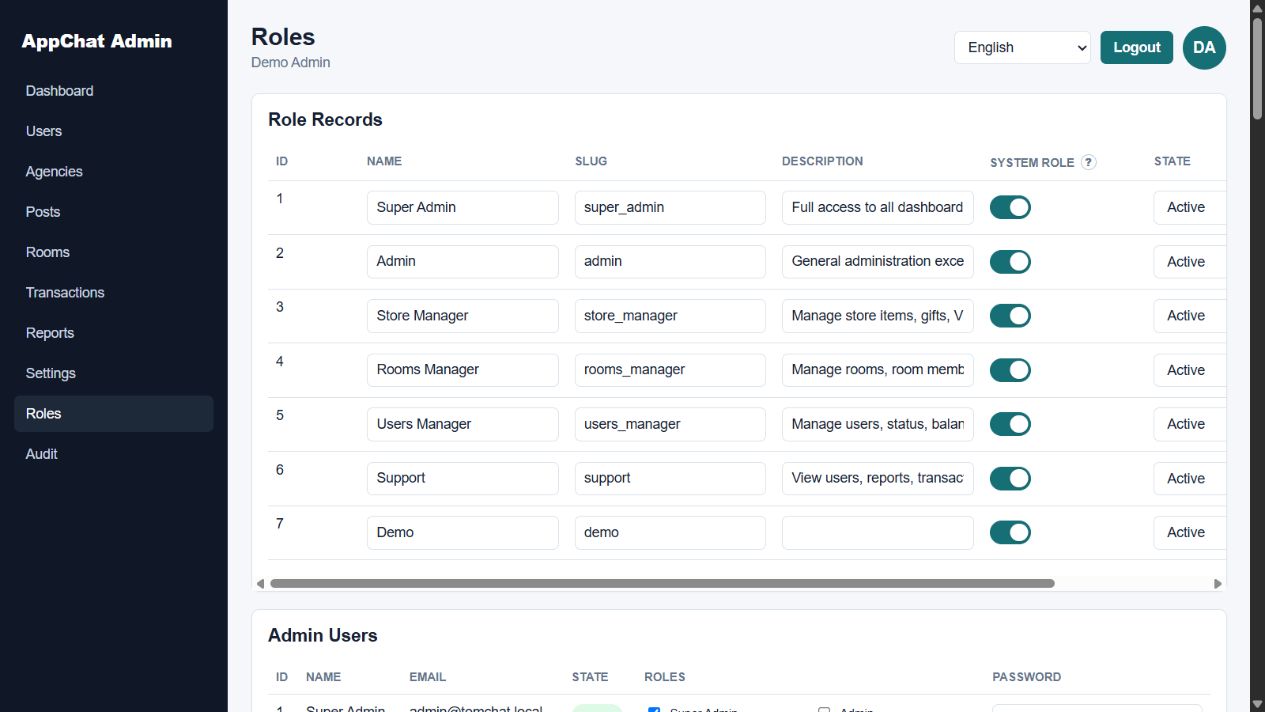
- Open Roles from the sidebar (
?page=roles). Expand Create Role. - Enter Name Community Moderator, Slug
community_moderator, Description Review reports, moderate posts and rooms, leave System role unchecked (0), and set State to Active (9). Save the role. - Find it under Role Permissions. Select only the slugs in the table below and press Save permissions for that role.
- In the same page's create-admin form, enter a dedicated moderator name, email, initial password and Active state. Create the account. Use a unique password for your installation.
- In Admin Users, select Community Moderator for that account and press Save roles. Unselect broader roles such as Super Admin/Admin; their permissions would be added to the moderator's permissions.
- Open a separate browser session and sign in as the moderator. Keep the original administrator session available for correction.
| Grant | Reason |
|---|---|
| dashboard.view | Allow landing dashboard and admin/me. |
| reports.view + reports.manage | Read reports and mark handled/ignored. |
| posts.view + posts.manage | Read posts/comments and moderate their state. |
| rooms.view + rooms.disable | Read rooms and disable/close a room. |
| users.view + users.ban | Inspect reported users and apply user status/ban actions. |
Do not grant users.balance, users.vip, transactions.view/manage, settings.view/manage, roles.view/manage, store.manage or vip.manage for this example. Add rooms.edit, rooms.members or users.edit only if those additional editing duties are intended. Dashboard counters are still visible through dashboard.view; this example restricts management sections, not every aggregate metric.
Prove the restriction works
- Verify Dashboard, Users, Rooms, Posts and Reports appear. Roles, Settings, Transactions and other ungranted sections should be absent.
- Visit
?page=rolesand?page=settingsdirectly. Expect permission denial, not editable content. - With a staging test report, mark it Handled. Confirm the status persists after reload.
- Attempt a balance-edit operation without users.balance; it must fail. Do not use real customers or live funds for this check.
- Back in the administrator session, inspect Audit for the action/account/target. Audit access requires audit.view.
- Remove reports.manage from Community Moderator and sign in again: Reports remains visible through reports.view, but moderation actions must fail or disappear. Restore it if the operator needs it.
An example failure is Permission denied: reports.manage. If access is unexpectedly broad,
inspect every assigned active role. If expected controls are missing, verify both the view and action
slugs, active role state, account state and current session.
Agency access is separate and granular
Grant agencies.view to list agencies; agencies.members.view to open members; agencies.edit to edit agency details; agencies.owner to change ownership; agencies.members.add/edit/remove for membership operations; agencies.delete to disable an agency. A moderator does not need these by default. Changing an agency's owner is not the same as assigning a dashboard admin role.
State 9 is Active. Removing a role assignment or disabling the role removes its contribution when permissions are loaded on a later request. Existing admin sessions have a 12-hour lifetime and can also be revoked through logout. Browser forms use a session CSRF token; API admin tokens are separate from mobile Auth-Token.
Role screen visual reference